Focus investigation time
Start with flagged activity rather than reviewing recordings without a reference.
Give your loss-prevention team a clearer starting point. AI Monitor connects supported behaviour alerts and checkout exceptions to the footage needed to investigate.
Start with your existing cameras. Compatibility assessed before rollout.
 AI MONITOR / VIDEO INTELLIGENCE
Start with flagged activity rather than reviewing recordings without a reference.
Link compatible till exceptions to the relevant checkout footage.
Use confirmed findings to guide training, procedures and further investigation.
A configured exception brings the till event to attention. The reviewer compares the available video and transaction record, then records whether it was a normal action, an error or an issue requiring investigation.
A stock discrepancy tells you there is a problem, but not necessarily where it started. Video and transaction context help investigators focus on events worth reviewing.
Start with the features that answer your business question. Expand each card for how it works.
Flag behaviour that needs a closer look.
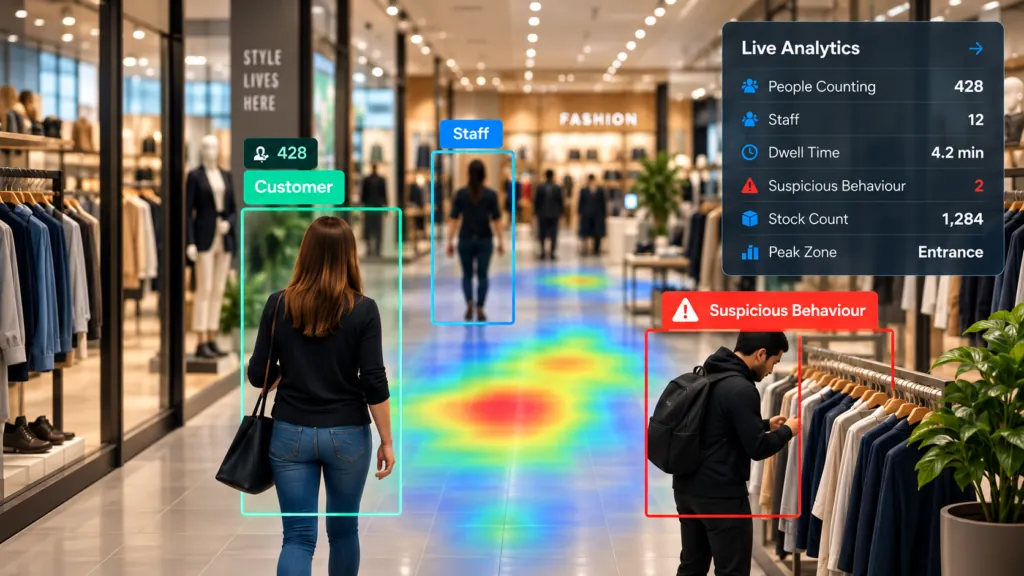
Supported behaviour analysis can bring possible concealment or unusual merchandise handling to attention. Human reviewers must check the complete context.
Start with transactions worth reviewing.
Assess available refund, void and other exception records from compatible point-of-sale systems. Link suitable transaction events to the relevant video.
Add visual context to a transaction.
Where supported, assess whether a customer appears to be present during a flagged checkout event. Camera view, synchronised timing and transaction data matter.
Review possible scanning discrepancies.
Assess supported analysis of cashier-operated lanes to flag possible differences between visible checkout activity and transaction records.
Focus review on possible missed scans.
Evaluate supported self-checkout loss detection against the actual lane design and transaction interface. A potential exception is not automatically intentional theft.
Keep the investigation organised.
Agree how reviewed footage, transaction references, findings and corrective actions are retained and shared with authorised managers.
An AI alert is not proof of theft or fraud. Staff must verify the circumstances and follow the organisation's approved procedures before taking action.
Agree the information your managers and operators need, with access matched to their responsibilities.
Reporting depends on the selected features, configuration and available data.
Begin with selected cameras and one clear objective. We assess, configure and test the solution before you scale.
Review your priorities, existing cameras, viewing angles and connectivity.
Agree the required features, hardware, licences and integrations.
Test representative activity against clear pilot success measures.
Train the team and agree reporting, support and any monitoring service.
Use authorised test scenarios and representative footage. Measure review usefulness and nuisance alerts; establish a loss baseline before claiming a financial improvement.
Pilot duration, equipment, costs and success criteria are agreed before deployment.
No. Some visual behaviour analysis can be assessed without transaction data. Transaction-based reporting and checkout correlation require suitable POS data and integration.
No. The workflow flags activity for review. Findings and any intervention must be based on verified context, not the alert alone.
Potentially. We assess camera compatibility, image quality, coverage, recording access and connectivity before recommending equipment changes. Some views may need adjustment or additional hardware.
Your proposal separates the selected software, on-site equipment, implementation, integrations and any ongoing monitoring or reporting service. Features are not automatically included in a base camera licence.
A scoped pilot can be proposed around selected cameras and measurable objectives. The duration, equipment responsibilities, costs and success criteria are agreed before it starts.
The assessment should define authorised users, viewing and export rights, retention, notices and data-handling requirements. Cloud locations and any required data transfers are reviewed for the selected platform.
Tell us about your business and the problem you want to solve. We will guide you through a relevant demonstration and the next steps.